How To Root Any Android Device
What is Rooting
Rooting is the Android equivalent of jailbreaking, a means of unlocking the operating system so you can install unapproved (by Google) apps, update the OS, replace the firmware, overclock or underclock the processor, customize just about anything, and so on.
How to Root
Rooting is often a simple and quick process. However, there’s no single standard way to root every device. If your device isn’t supported, check out the XDA Developers forum and look at the subforum for your specific model of device. This is a good place to start finding out how other people have rooted your device.
Below are the steps to achieve this.
Step 1:
Download and install Kingo Android Root.

Step 2:
Enable USB debugging mode on your phone. If it's running Android 4.0 or 4.1, tap Settings, Developer Options, then tick the box for "USB debugging." (You may need to switch "Developer options" to On before you can do so.) On Android 4.2, tap Settings, About Phone, Developer Options, and then tick USB debugging." Then tap OK to approve the setting change.
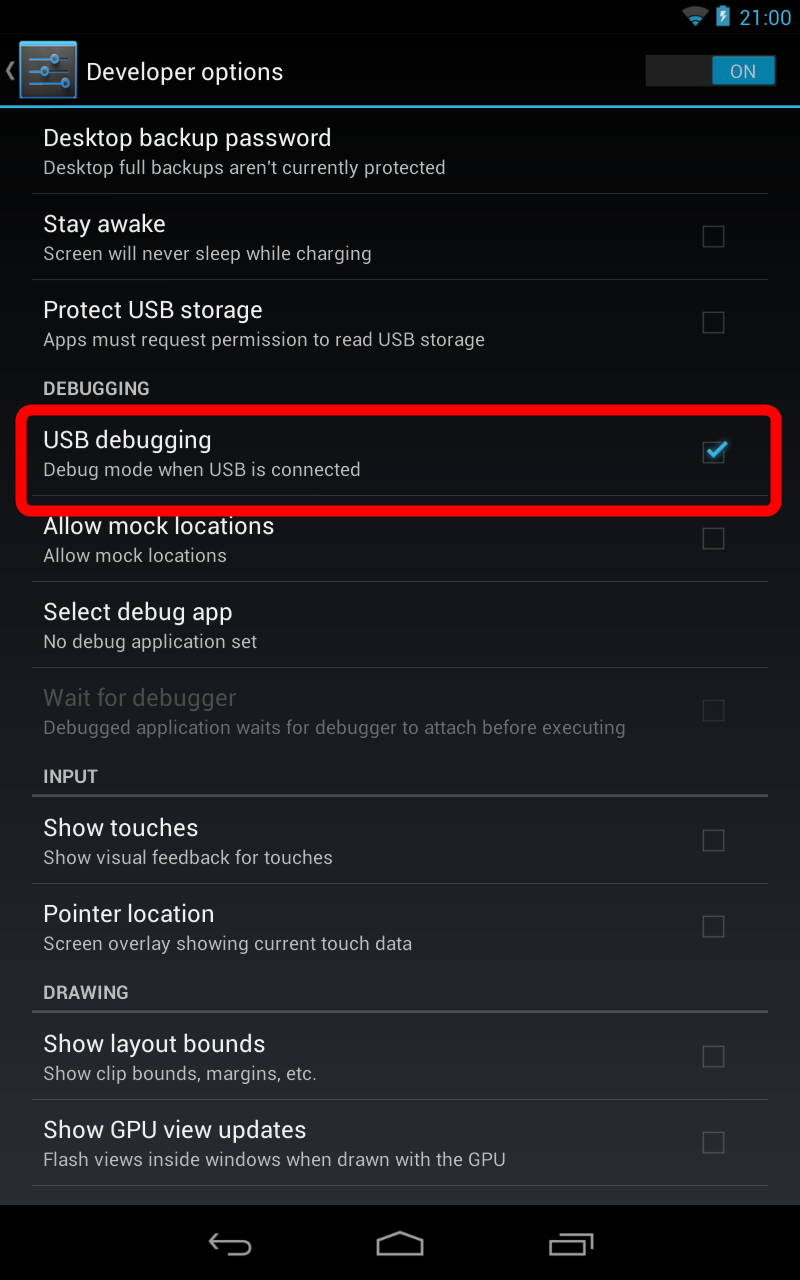
On Android 4.3 and later (including 5.0, though this also applies to some versions of 4.2), tap Settings, About Phone, then scroll down to Build Number. Tap it seven times, at which point you should see the message, "You are now a developer!"
With that done, tap Settings, About Phone, Developer Options, and then tick USB debugging." Then tap OK to approve the setting change.
Step 3:
Run Android Root on your PC, then connect your phone via its USB sync cable. After a moment, the former should show a connection to the latter. Your device screen may show an "Allow USB debugging?" pop-up. Tick "Always allow from this computer," then tap OK.
Step 4:
Click Root, then sit back and wait while the utility does its thing.
And that's all there is to it. If you decide you want to reverse the process, just run Android Root again, connect your phone, then click Remove Root.
SEE ROOT DIRECTORY
How To Root Any Android Device
 Reviewed by Unknown
on
03:34
Rating:
Reviewed by Unknown
on
03:34
Rating:
Reviewed by Unknown
on
03:34
Rating:


No comments: